
Wordfast Pro and DeepL
DeepL has changed their authenticating method and we need to adapt WF Pro to it. We expect a mid-April delivery date for the update.
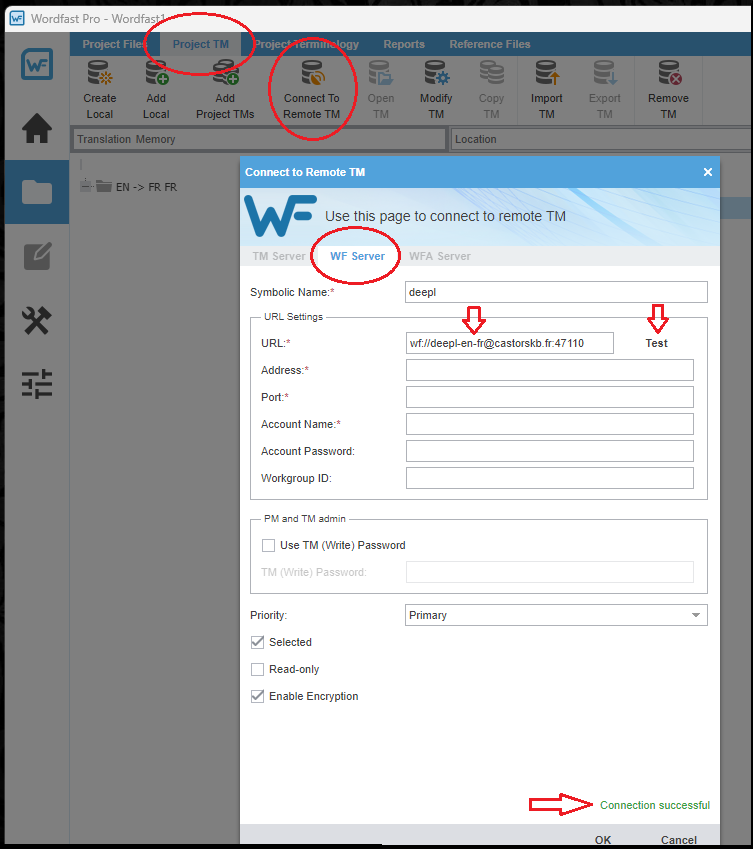
Until WFP is patched, we offer you a free access to DeepL via a server that we set up. It's on us. You only have to connect to a "Remote TM". It's rather simple, here are the steps:
- In your Wordfast Pro (WFP) project, click "Project TM", > "Connect to Remote TM".
- Click "WF Server". Enter a "Symbolic Name" of your choice, for example, "deepl".
-
In the URL field, paste the following:
In the example above, the language pair is en-fr. Please change it to your language pair. For example, for English to German, you would enter wf://deepl-en-de@castorskb.fr:47110; for English to Spanish you would enter wf://deepl-en-es@castorskb.fr:47110, etc. - Click "Test". You should see a green "Connection successful" mention at the bottom:
The above is valid for any combination of two of the following languages:
en, fr, it, de, es, pt, nl, da, no, sv, fi, el, hr, hu, ro, mk, bg, lt, lv, pl, sq, sk, ga, ja, ko, zh, ar, he, cs
If the above does not work for you, please try the following options:
- 1. Use Wordfast Anywhere (WFA). It comes free with your WF Pro license. You will essentially find the same service, online.
-
2. (more complex) Use WFA just to pretranslate with DeepL.
This way you only use WF Anywhere to get the suggestions from DeepL. The rest of the work can be done on WFP as usual.
Follow these steps:
- Add source file to your WFP project (prefer projects with small number of files)
- Export GLP (untick everything but txlf)
- Sign into WFA by clicking on "Access Wordfast Anywhere" button in your Wordfast Account (www.wordfast.com/myaccount)
- Set up DeepL MT in WFA [https://anywhere.wordfast.com/help/help.html#wfasetupMT]
- Import the above GLP in WFA [https://anywhere.wordfast.com/help/help.html#pkgupload]
- Pre translate using DeepL when no match [https://anywhere.wordfast.com/help/help.html# pretranslateDocuments]
- Export project as GLP (txlf only) [https://anywhere.wordfast.com/help/help.html#pkgdownload ]
- Import project in WFP and choose the "Update an existing project" option.
This video shows all the process: https://youtu.be/P4VmhUx7rcI?si=GHLAQDJZS_bfHT3E -
3. (even more complex) Use Wordfast Server (WFS), which is free for personal use as a DeepL server. You can use WFS locally. See the tutorial here. For "power users".